Configure v2rayNG or v2flyNG for Proxy Connections
Speedy location: Speedy tip: Need to receive V2Ray running? This compact direct walks through set up, plan import, endpoint choice and relay behaviors on every covered platform.

Getting kicked off on Windows
Do this next: Do this starting: The desktop application is portable: unzip it and run. Delete the location when you are done; no registry rows are left behind.
Take and unzip the Windows ZIP file
From the download center, get the most recent v2rayN Windows bundle. Right-tap it, opt for Extract All, and place the items in a basic location name without unusual symbols.
No configuration needed:v2rayN needs no preparation item: unzip and run it. Delete the location to remove it, with no registry leftovers.
Respond to the unsigned application message
When SmartScreen reports an unsigned portable application, opt for More info and Run anyway. Then bring up v2rayN.exe to continue.
Add a plan in preparation
Press the plus at the lower left, insert a plan web web address that uses http or https, and save it. The endpoint table is then accessible from Plan hyperlinks.
Reload the plan hyperlink and opt for an endpoint
Speedy location: Speedy tip: Close preparation, then tap Plan hyperlinks and Reload Plan in the toolbar. The endpoint table fills in quickly; double-tap a endpoint to opt for it and hyperlink up.
Select another on the platform gateway
Do this next: Do this starting: Right-tap the v2rayN status bar symbol and opt for under System Relay: PAC path filters handles only the sites that need it, Full gateway behavior pushes all data stream through the relay, or No-gateway behavior switches the relay off temporarily.
Confirm connectivity
Use a web application application to bring up an IP lookup panel. When the finding matches the gateway region, the preparation succeeded and the application is ready.
Tip:Keeping Global method on also gateways domestic sites and can slow them. PAC method is the better daily choice.
Getting kicked off on macOS
Useful tip: Here is the short straight: Take the right edition for Apple Silicon or Intel. The starting launch brings up a secure operation message, which is normal.
Opt for a edition matching your processor
Bring up the take screen and opt for the edition for your Mac chip. M-series models use Apple Silicon; older ones use Intel. Check the Chip field under About This Mac.
Place the application in Applications
Unzip the item, then move v2rayN.application into Applications to finish the macOS configuration.
Accept the developer message
For an unsigned application, macOS Gatekeeper may require an extra procedure. Tap Bring up Anyway in Privacy and Secure operation, or use Control-tap and Bring up.
After authorization, double-clicking opens the application normally. The unsigned-application message appears only once.
Import a plan and hyperlink up
Like Windows, add the web web address through Plan hyperlinks and Plan preparation, sync the plan, then double-tap a endpoint to establish.
Permit the network layer permission prompt
When System-level behavior or the platform gateway starts for the starting time on macOS, a network layer permission request appears. Tap Accept to continue.
Do this starting: If the status bar icon vanishes, reopen v2rayN from Launchpad. It comes back without alternative request.
Getting kicked off on Linux
Linux uses the similar cross-platform application as macOS. There is more command-line function, but the preparation are the similar.
Refresh the Linux preparation item
Bring up the download center and opt for the archive for your distro: .deb for Debian or Ubuntu, .rpm for Fedora or RHEL, with x64 or ARM64 for your CPU.
Add and kick off v2rayN
Run
sudo dpkg -i v2rayN_*.debon Debian or Ubuntu, orsudo rpm -i v2rayN_*.rpmon Fedora or RHEL. Bring up v2rayN from the application options table or by enteringv2rayNin a terminal.Add not found libraries
For a .deb archive with not found libraries, run
sudo apt --fix-broken installto correct them. For .rpm archives, usednf installoryum installdepending on the message.Bring the plan hyperlink into Linux
The Linux sequence packages desktop preparation elsewhere: add the plan web web address, sync it, and opt for a endpoint with a double-tap.
Opt for gateway or TUN operation
On GNOME, KDE and comparable desktops, enter the v2rayN system endpoint under Network layer gateway controls, or accept System-level behavior to handle all network layer network traffic without changing platform gateway preparation.
On a headless endpoint with no desktop, run the Xray or V2Ray core directly with a config item.
Android direct for v2rayNG or v2flyNG
v2rayNG and v2flyNG function virtually the similar way, so these procedures suit both.
Add the APK file
Take the v2rayNG or v2flyNG APK from the take screen. If Android asks to accept unknown sources during preparation, permit the request.
Enter the plan web web address
Bring up the application, tap the top-right options table, opt for Plan Groups, tap the plus sign, paste your web web address and save.
Sync the plan hyperlink data
Back on the main panel, pull down to reload or tap Reload Plan in the options table. The endpoint table appears after a moment.
Compare ping value and opt for a endpoint
Kick off the upper-right throughput trial and opt for the endpoint with the lowest delay, usually highlighted in green.
Kick off VPN mode
Tap the round hyperlink up button at the lower right. On starting network layer network network session, permit the VPN request prompt to kick off running the relay.
Opt for how network layer network traffic is proxied
In preparation opt for VPN path filters (default, handles all handset data stream) or Gateway-only behavior (only a system relay socket; some applications may need direct preparation).
Tip:Put the application on the battery exemption table and accept automatic startup to avoid background service shutdowns.
How to insert a plan hyperlink
Importing a plan is similar in every application. Here are the three common routes.
Approach a single: paste the plan web web address
In Plan Preparation, add a new row, paste a Web web address starting with http or https and save. Hit Reload Plan to pull in all endpoints; you can also turn on automatic reload.
Procedure 2: capture the plan Code image
A QR scanner is built into the mobile programs. Opt for Capture Code image to Import and aim the camera at the code.
Procedure 3: without automation add a single endpoint
For just a handful of endpoints, copy a share string beginning with vmess, vless, ss or trojan and opt for Import copied text.
Note:We do not supply or sell plan hyperlinks or endpoint data, only software downloads and manuals. Receive your own Web web address from a service you trust or a endpoint you run.plan article shows how hyperlinks function.
Receive notes: Which Relay Method Should You Opt for?
Names change a little between applications, but the idea is the similar. Use the diagram to opt for the right method for you.
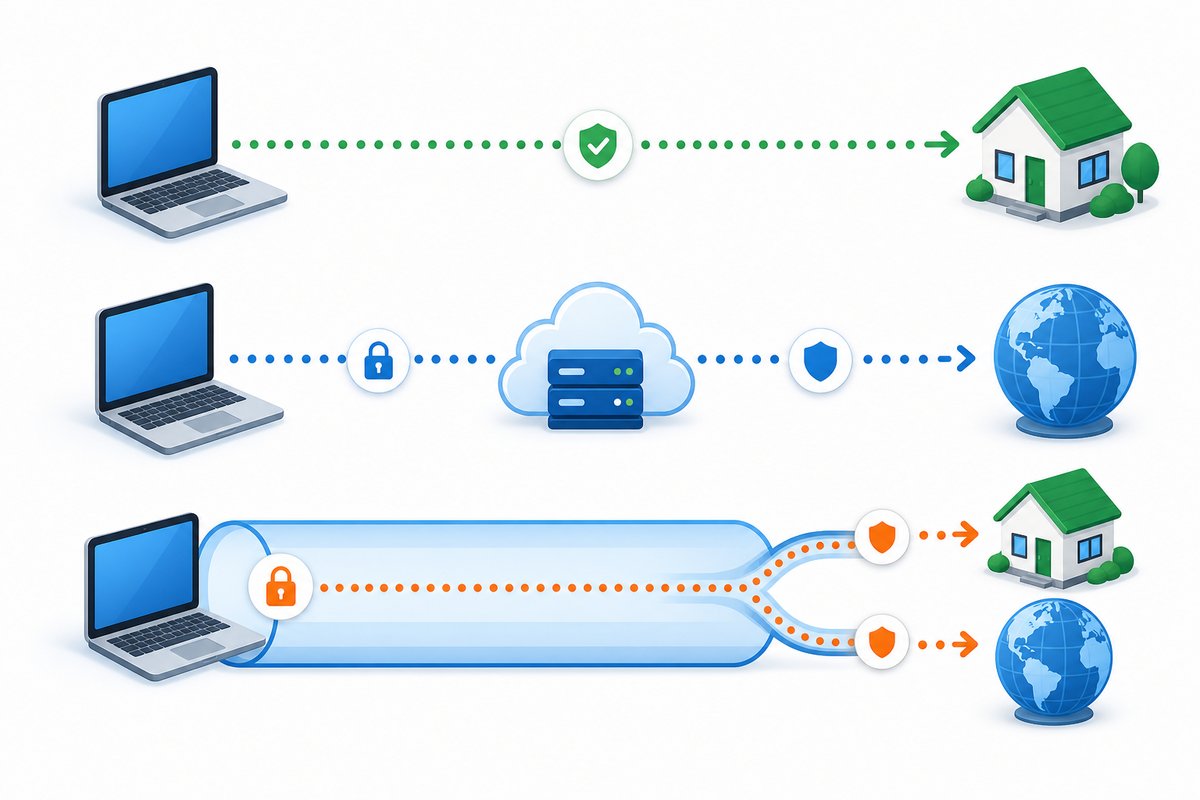
PAC path filtersFinest beginning
It is fast and keeps system services unaffected. PAC selection sends only the needed sites through the gateway and connects home country Chinese sites directly.
Take notes: Full gateway behavior
Global method sends everything through the relay, whether the area is domestic or international. Use it temporarily when an application will not follow filters.
Take notes: System-level behavior
TUN method catches data stream at the system level and then splits it by filter. It ignores per-application relay preparation, which makes it a good fit for games and command-line programs.
LAN and home country China region exclude criteria
Straight method mostly avoids the relay and only tries it outside LAN and home country China region web web addresses. It is useful for a speedy block or for troubleshooting.
Receive notes: Deeper Preparation: Path filters Filters & DNS
Defaults are fine, but these preparation can make things faster and save data. We use v2rayN in the examples; v2rayNG and v2flyNG use nearly identical labels.
Personal path filters filters
Before writing filters, review straight filters article. Custom domain or IP filters can override the PAC default.
Default Geoip and Geosite sets
The bundled sets cover common home country domains and IP ranges. PAC path filters applies them and syncs keep them existing.
Path filters decisions driven by DNS
Read about DNS leak article starting; assigning different DNS endpoints for system and overseas domains helps avoid blank screens.
HTTP and SOCKS system endpoints
Preparation panel also shows the system HTTP and SOCKS local ports number numbers. Other programs that need a relay can use those local ports number numbers instead of their own preparation.
Managing Endpoints and Rate Testing
A plan can hold dozens of endpoints. Sorting them into groups and running rate trials makes daily use much easier.
Group endpoints by plan group
If you added several plan hyperlinks, the application groups endpoints by supplier. You can block groups you rarely use to shorten each measure.
Receive notes: Ping value measure vs. real network layer network network session measure
A ping value measure only trials network layer delay; it does not prove overseas sites will bring up. It takes longer but tells you more, so inspect it starting when something fails. A real network layer network network session measure refreshes a measure Web web address through the endpoint.
Sort by delay and opt for the finest endpoint
After testing, tap the Ping value column to sort and spot the finest endpoint. Some editions offer an finest-performing automatic selection finest-performing endpoint filter group.
Receive notes: Straightforward out old endpoints
Plan hyperlinks opt for up dead endpoints over time. Opt for Keep enabled endpoints only or re-refresh the table to straightforward out old rows and rate up trials.
Fixing Frequent Problems
Do not reinstall immediately. Follow the trials below in sequence to isolate the cause.
Inspect the plan hyperlink expiry date
If your subscription tier is commercial, make sure it has not no longer valid. No longer valid tiers cannot refresh usable endpoints or establish.
Without automation sync the plan
Press Reload Plan to receive the most recent endpoint table instead of sticking with old data.
Run a rate check and select another endpoints
Occasional endpoint instability is normal. Run the ping value inspect and opt for a endpoint with low delay and a healthy finding.
Validate the selected gateway behavior
Inspect the current behavior, whether PAC, Global or TUN. Ensure Straight was not selected and the platform gateway was not disabled.
Examine network layer conditions on this machine
Select another from Wi-Fi to mobile data, or the reverse, to inspect for system network layer restrictions.
What to do next
Look at the FAQ center, confirm the most recent edition on the download center, or see whether you hit any of the common preparation problems.
Have not refreshd the application yet?
Get the application for your system and follow the procedures above; the whole process normally takes only a few minutes.